Using multiple Ggr instances
In order to obtain reliable Selenium cluster you need to install multiple Ggr
instances behind reliable load balancer such as
AWS Elastic Load Balancing or
Keepalived. To check Ggr instance health use /ping:
curl -s http://example.com:4444/ping{"uptime":"2m46.854829503s","lastReloadTime":"2017-05-12 12:33:06.322038542 +0300 MSK","numRequests":42, "numSessions":19, "version": "1.6.3"}It returns 200 OK when Ggr operates normally. Additionally, server uptime,
last quota reload time and overall number of session requests from service
startup are returned in JSON format.
Why Ggr is stateless
Section titled “Why Ggr is stateless”Selenium uses an HTTP-based protocol. That means every action in Selenium, e.g. launching browser or taking screenshot is a separate HTTP request. When multiple instances of Ggr are handling requests behind load balancer every request can be routed to any of these instances. Here’s how it works.
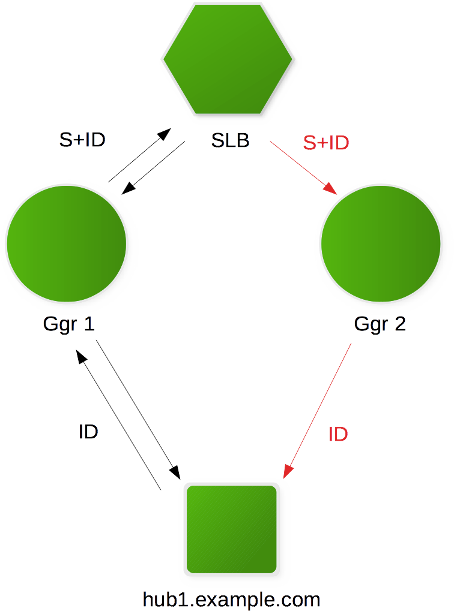
On the picture above there is one SLB, two instances of Ggr and one Selenium hub. Every Selenium session consists of two stages: creating new session and other requests. When you request a new session you get its identifier called session ID. You must always use this session ID in consequent requests so Selenium applies these requests to correct browser process.
For example let’s assume that new session request is routed to Ggr 1 (black
arrows). This Ggr randomly chooses a hub hub1.example.com and creates a new
session on it. This hub returns some session identifier marked as ID on the
picture. Ggr 1 in its turn knows that session was created on
hub1.example.com and extends the session ID by adding an MD5 sum S of hub
hostname. This is why it returns to user new longer session with identifier
S+ID just by concatenating two strings. Every Ggr instance during startup
creates an in-memory map — storing host names and their MD5 sums. When
consequent request for the same session S+ID arrives e.g. to Ggr 2 (red
arrows) it extracts S from extended session ID and finds hub hostname in its
map. Then it removes S from request session identifier and simply proxies
this request to hub corresponding to S.
Getting host by session ID
Section titled “Getting host by session ID”Sometimes you may want to get real hostname behind Ggr that is executing browser session. This can be done using session ID:
curl -s http://test:test-password@ggr.example.com:4444/host/4355afe3f54e61eb320993066fb425133b79d8c3-e725-4f90-9e57-548b8ec3f160{"Name":"my-host.example.com","Port":4444,"Count":5,"Username":"","Password":""}